VMA Stream Reader

I read some horrible, hopefully false, news, posted in this forum.

I refuse to believe it.
Alas, I must bear the curse of every messenger. We have known this since ancient times.
Nothing is rational when it comes to war...:angry:

(I trust in your good faith that you do not consider me one of those who spread false news.
I hope you understand my concern when I opened that thread.
Unfortunately, as usual, what we fear will happen. :(
The pain is not only yours, but of all those who cared for and appreciated this man.)
 
Last edited:
I am still thinking about CrazyScan... I really hope the news is false.

To get my mind off, I will share what I am working on:

I’m currently testing a new module for the next VMA release: a live motion-vector analyzer based directly on decoder motion data.

The tool visualizes macroblocks, motion vectors, direction classification, and basic coherence metrics in real time, fed from live UDP streams.

This is primarily aimed at encoder diagnostics and analysis of challenging content such as sports, commercials, and other high-motion material.

1770599497762.webp
 
(I trust in your good faith that you do not consider me one of those who spread false news.
I hope you understand my concern when I opened that thread.
Unfortunately, as usual, what we fear will happen. :(
The pain is not only yours, but of all those who cared for and appreciated this man.)
Dear satesco,

I have the highest respect for you, and it never crossed my mind that you were sharing this news lightly or in bad faith. Quite the opposite.

My hope that it might be false or a mistake comes only from how deeply saddening it is. If this news is true, then it is a great loss — not only for you and me, but for everyone who benefited from CrazyCat’s work and dedication over so many years.

I don’t wish to speculate further, and I also try to avoid political discussions in public forums. Places like this one are where many of us come to share knowledge, collaborate, and find a bit of joy in technical work we care about.

If the news is confirmed, then all I can say is that his contributions will not be forgotten, and he deserves to be remembered with respect.

Kind regards,
Vitor
 
New version: https://vma-broadcast.com/wp-content/uploads/2025/04/VMA Video Analyser Setup - 2026-02-09.zip

2026-02-09
- VMA Motion Analyser
- New tool for Video Motion Analysis
- Supports video streams and files
- VMA Transport Stream Analyser
- Double click on a service in Statics opens a context menu
- Allows to start Quick Preview Panel (as before)
- VMA Video Analyser
- VMA Motion Analyser

1770636771376.webp

VMA Motion Analyser – Real-Time Motion Vector Analysis

I’ve released a new tool called VMA Motion Analyser for real-time visualisation and analysis of codec motion vectors in live streams or video files.

The tool decodes video using FFmpeg and displays the actual motion vectors generated by the encoder, overlaid on the picture and aligned to the macroblock grid. This is not optical flow — it shows true codec-level motion data, exactly as used for motion compensation.

Key features:
  • Real-time motion vectors per macroblock
  • Live streams (UDP/RTP/RTSP/HTTP) and file playback
  • Macroblock grid overlay
  • Motion heatmap (motion energy distribution)
  • Direction-based colouring (horizontal / vertical / diagonal)
  • Switchable enhanced vs true-scale motion vectors
Live statistics:
  • Vector count and static blocks
  • Average and RMS motion magnitude
  • Motion coherence (direction consistency)
This is useful for broadcast engineering, encoder evaluation, compression analysis, and diagnosing motion-related artefacts in live services.

The tool is considered feature-complete and stable. Feedback and technical discussion are welcome.
 
New version: https://vma-broadcast.com/wp-content/uploads/2025/04/VMA Video Analyser Setup - 2026-02-12.zip

History:

2026-02-12
- VMA Motion Analyser
- Added audio playback support
- Added complete Video and Audio codec information
- Multiple internal improvements and optimizations

1770858421374.webp

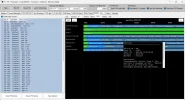
The bottom of the form shows extensive Video and Audio CODEC information.

This gives a great insight of what video/audio codecs are really being used - sometimes the PMT may contain wrong information.

If you wonder why your satellite receive is not displaying video or playing audio, this may reveal the cause.
 

Attachments

  • VMA TS Analyser-11582 H_EPG-ok_2026-02-18_19-13-51.webp
    VMA TS Analyser-11582 H_EPG-ok_2026-02-18_19-13-51.webp
    149.2 KB · Views: 11
New version: https://vma-broadcast.com/wp-content/uploads/2025/04/VMA Video Analyser Setup - 2026-02-21.zip

History:

2026-02-21
-VMA Stream Reader
- Improved streamreader.dll handling
- Selected DLL is retained with general settings (Use SAVE in Settings tab)
- All DLL are copied once to %appdata%\VMA Stream Reader
to avoid file permission problems
- A DLL combo (streamreader.dll & streamreader.ini) can be cloned
- Added streamreader.ini editor in Settings tab
- Allows to edit the selected streamreader.ini

1771697277931.webp

1771695993611.webp

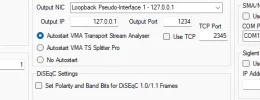
For the selected streamreader.dll it is now possible to edit the respective streamreader.ini file.

All streamreader.dll & streamreader.ini combos reside in individual folders that are copied at first start to %appdata%\VMA Stream Reader.

It is possible to clone a DLL/INI combo to use different configurations. Use APPLY to reload the DLL (requires reconnecting the tuner afterwards).
 
IMPORTANT: If you downloaded the latest setup before 18:37 UTC, please download again!

The VMA Stream Reader had a bug causing the NIC in Settings to be wrong.
 
This version has major changes in the handling of streamreader.dll, which caused some issues, which I hope are all fixed. This is why I had to upload the last installer three times in a short period.

So what changed? Before, the regular default streamreader.dll in the program folder was always loaded and then the user could go to settings and chose a different DLL version. This choice was not saved with the settings (I think).

Now the selected DLL is saved with the settings and loaded at startup.

Also, the DLLs are copied from the program folder to the app data folder if it doesn't exist. The DLLs are started from here. Each DLL and respective ini are in an individual folder, so that each DLL has its own INI. Because they are in appdata, there is no problem in editing and saving the ini.

Switching DLL or applying the same DLL with edited INI doesn't require to manually disconnect the tuner (releasing the DLL). This is done automatically.

So now you can use the software and tweak the INI without having to deal with file permissions or having to restart VMA Stream Reader.

Finally, any selected DLL can be cloned, which means that a new folder is created where the copied DLL and INI are stored. This way you can configure different Streamreader Setups, i.e. for different satellites or tuners.
 
Back
Top