GTMedia GTCombo 4:2:2 receiver

Many Android based boxes suffer from similar Standby issues. I did see someone mention above hdmi which got me thinking. Do you have an alternative hdmi cable you can swap in just to rule that option out. Also can you power up the GT box without hdmi cable connected and then connect the hdmi cable at the TV end. Are you showing a startup screen once connected.

Do you have HDMI-CEC enabled on your setup. Also make sure you have all apps closed on the GT box before you place it in Standby.

Ideally you’ll need another owner to replicate your setup behaviour. I imagine most are just powering off their GT box rather than leaving them in overnight Standby.
Somewhere further back I did mention I had changed the monitor and the HDMI cable just in case it fixed issues, but alas no.
Btw. John - have you resolved your viewing issue through the cable or are you still watching via the GTPlay casting ?

Strangely the second TV - a slightly larger LG 720 screen is able to turn the receiver into standby when its own remote power switch is pushed - though not the other way round, but the power on from the TV remote does not take the GTMedia box out of standby.

Perhaps I'm getting close.
 
Strangely the second TV - a slightly larger LG 720 screen is able to turn the receiver into standby when its own remote power switch is pushed - though not the other way round, but the power on from the TV remote does not take the GTMedia box out of standby.
That's a function of HDMI-CEC. You could try disabling it or modifying an HDMI cable to physically prevent it. There are also adapters available that block the signal.

I wonder if it's the DVB-T that's causing the problems. Perhaps some kind of overnight auto channel or EPG update failing and causing the system to crash.
 
That's a function of HDMI-CEC. You could try disabling it or modifying an HDMI cable to physically prevent it. There are also adapters available that block the signal.

I wonder if it's the DVB-T that's causing the problems. Perhaps some kind of overnight auto channel or EPG update failing and causing the system to crash.
I have DVB-T channels in my box, and have no overnight lock ups...
 
Somewhere further back I did mention I had changed the monitor and the HDMI cable just in case it fixed issues, but alas no.
Btw. John - have you resolved your viewing issue through the cable or are you still watching via the GTPlay casting ?

Strangely the second TV - a slightly larger LG 720 screen is able to turn the receiver into standby when its own remote power switch is pushed - though not the other way round, but the power on from the TV remote does not take the GTMedia box out of standby.

Perhaps I'm getting close.

>> Btw. John - have you resolved your viewing issue through the cable or are you still watching via the GTPlay casting ?<<

That was pilot error on my behalf CH, i had set the font size in 'Device Settings >More Settings>Display (font size & display size)
to a larger setting but it cropped the info on the screen - returned them back to 'Default'
 
That's a function of HDMI-CEC. You could try disabling it or modifying an HDMI cable to physically prevent it. There are also adapters available that block the signal.

I wonder if it's the DVB-T that's causing the problems. Perhaps some kind of overnight auto channel or EPG update failing and causing the system to crash.
On the LG TV here it is called 'Simplink'. Turning it off prevents the activation signal getting from TV to receiver, I am using the HDMI cable supplied with the Combo, but providing a much more expensive cable makes no difference the other way.

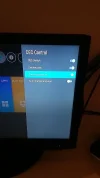
Turning the CEC switch within the Combo menus makes no difference at all (though I have seen a channel start up change once or twice when I turn on the Combo with its own remote, perhaps coincidence).
 
Somewhere further back I did mention I had changed the monitor and the HDMI cable just in case it fixed issues, but alas no.
Btw. John - have you resolved your viewing issue through the cable or are you still watching via the GTPlay casting ?

Strangely the second TV - a slightly larger LG 720 screen is able to turn the receiver into standby when its own remote power switch is pushed - though not the other way round, but the power on from the TV remote does not take the GTMedia box out of standby.

Perhaps I'm getting close.
That’s why I asked if you had HDMI CEC enabled on your system. Anyway that’s my tuppence worth for now. Not sure if you tried reflashing the firmware yet but you have enough suggestions to push on.
 
That’s why I asked if you had HDMI CEC enabled on your system. Anyway that’s my tuppence worth for now. Not sure if you tried reflashing the firmware yet but you have enough suggestions to push on.
As per the above, changing the CEC within the menu makes no difference at all to how the two units interact with each other, only the Simplink on/off setting within the TV itself. If I get time later I will try the original 1080 screen settings.
 

Attachments

  • CEC.webp
    CEC.webp
    65.2 KB · Views: 36
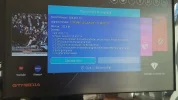
New Firmware C20.A9.1.14 dated Jan 12th 2022 offered at power up today. I loaded it OK from the internet. At the end an error was reported. I then booted the box and all seems good. See
Code:
https://www.freesat.cn/forum/viewtopic.php?f=55&p=108585#p108585
for info.
 
New Firmware C20.A9.1.14 dated Jan 12th 2022 offered at power up today. I loaded it OK from the internet. At the end an error was reported. I then booted the box and all seems good. See GT Combo Firmware C20.A9.1.14 - GTMEDIA Forum for info.

Interesting, just powered up at 9.10am but no auto update screen splash.
Check manually with the box and states ver 1.13 is the current version.
I'll check GTMedia site for a usb download.
**Edit - seen the site comments re: latest FW , wondering if they have removed the file Simon due to the glitch you mentioned
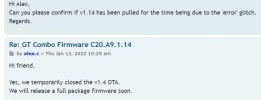
**Edit No2 - just sent Alex (GTMedia Team) a message asking if they have pulled the v1.14 file for the time being
 
Last edited:
With the new firmware, I've just done a scan of 7E looking for feeds and all seems well including the auto function.
 
Hmm. I've had the GTCombo on since 7am and so far there is no upgrade hint.
 
Hmm. I've had the GTCombo on since 7am and so far there is no upgrade hint.
Looking at the GT Media forum I would think they have removed it for now. Although I powered mine up at about the same time as you.
 
Just had this on email.....

Hi My Friend!​

I'm sorry I didn't inform you in time, recently our GTMEDIA official website will be maintained and updated for a short time, please rest assured that we will not be irresponsible, we will continue to do a good job of our after-sales service, customers who have recently placed orders on the official website can find your order history and package logistics tracking status here, if you have any questions about our products, you can also find the answer in our community forum. The new GTMEDIA website will be launched as soon as possible, and you will be informed as soon as possible. Please wait patiently for a while! If you have any other questions, please feel free to contact us and we will reply as soon as possible!

Best Regard
 
v1.14 pulled for the time being confirmed

1642070138750.webp
 
v1.14 is still available via usb download from GTMedia site
 
v1.14 is still available via usb download from GTMedia site
Thanks, but no. It will have been pulled for a reason, besides I would prefer to work with this receiver in the same manner as the average upstanding citizen for the time being, there should be little need to reflash as long as the manufacturer keeps up the receiver support.
 
And the online update has returned.
 

Attachments

  • 20220113_120625.webp
    20220113_120625.webp
    134.5 KB · Views: 30
A quick check and the update hasn't fixed the display signal levels for terrestrial, still at 95/95% no matter what channel is selected.
 
Back
Top