
- Forums
- Satellite TV receivers & systems support forums
- Satellite PC Card Receivers, Internet by Satellite
You are using an out of date browser. It may not display this or other websites correctly.
You should upgrade or use an alternative browser.
You should upgrade or use an alternative browser.
Blindscan on linux with tbs cards
- Thread starter deeptho
- Start date
djris2
Member
- My Satellite Setup
- 185cm PAP Ljubljana microwave Dish, 120cm NoName Primefocus Dish
OS'S : Arch Linux, Windows Server 2025 Datacenter
SERVERS: Supermicro SC846, 2x Custom 4U Servers, Supermicro 1U Firewall
- My Location
- Izlake, Slovenia
i have to report a problem, i updated my system after 2 months at least and after this drivers signal strenght reports -319db and nothing locks on tvheadend i have 6905 inside my server and i use 6.14-rt kernel the other systems i had before i gave them away, while original drivers from tbs work flawlessly
deeptho
Specialist Contributor
- My Satellite Setup
- Wavefrontier T90, Laminas 120cm, 2 other dishes; tbs 5927, tbs6904, tbs6909x, tbs6903x, tbs5990, tbs6981,tbs5927
- My Location
- Europe
Maybe the problem is now fixed in the newest drivers (of today)i have to report a problem, i updated my system after 2 months at least and after this drivers signal strenght reports -319db and nothing locks on tvheadend i have 6905 inside my server and i use 6.14-rt kernel the other systems i had before i gave them away, while original drivers from tbs work flawlessly
tasoss
Member
- My Satellite Setup
- 6903,6903x,6909x 6908 etc. Dishes on various satellites(7east,39east,30w,8w etc) Windows & Linux for blind scanning and Linux for channel scanning.
- My Location
- Greece

satesco
Specialist Contributor
- My Satellite Setup
- seven antennas,one toroidal with 16 lnbs,
6 satellite receivers,2 Meters,9 PC cards(tbs6983,6903,6590,6504,6522,6209,2603,6909X,6903X,6902se,skystar hd2),2 tuners usb-tbs5927, TBS5927SE USB & tbs5925,Skystar HD.
Satellite reception between 100.5E-50.0W
- My Location
- Romania
I installed the 6.12.34-generic kernel on Ubuntu 24.02 and, after updating gcc to 14, I was able to install the drivers without problems. It would probably work on the 6.14 kernel.
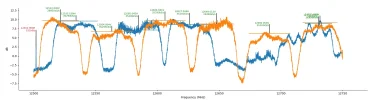
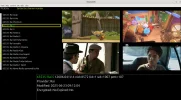
The test with 6903x at 5.0W on upper band muxes had no problems with blindscan, even on stream 4 at 12606 V; I locked it and found the services.
Unfortunately, on stream 5 (T2-MI), the app crashed every time with the same problems as it did with neumoDVB on this stream.
The test with 6903x at 5.0W on upper band muxes had no problems with blindscan, even on stream 4 at 12606 V; I locked it and found the services.
Unfortunately, on stream 5 (T2-MI), the app crashed every time with the same problems as it did with neumoDVB on this stream.
Attachments
I installed the 6.12.34-generic kernel on Ubuntu 24.02 and, after updating gcc to 14, I was able to install the drivers without problems. It would probably work on the 6.14 kernel.
The test with 6903x at 5.0W on upper band muxes had no problems with blindscan, even on stream 4 at 12606 V; I locked it and found the services.
Unfortunately, on stream 5 (T2-MI), the app crashed every time with the same problems as it did with neumoDVB on this stream.
@satesco
Was that ububtu 24.04.02 that you used or was it 24.02 please ?
If I follow your description correctly, you installed kernel 6.12.34 on to ubuntu and then updated the ubuntu GNU Compiler Collection (GCC) to v14 followed by inststallation of the deeptho blind scan drivers. Is that correct?
Aplogies for the dumb questions but for people who are not experienced with linux this app is a nightmare to install and get working correctly.
andimik
Member
- My Satellite Setup
- 120cm with Stab rotor, TBS 5927 and 6903xv1
- My Location
- Southern Austria
It's not a dumb question. I have been working with Ubuntu for more than 10 years, but I could never achieve using it with deeptho's tools, although I have an 6903x and am contributing to lots of sat and terrestrial open source software...
satesco
Specialist Contributor
- My Satellite Setup
- seven antennas,one toroidal with 16 lnbs,
6 satellite receivers,2 Meters,9 PC cards(tbs6983,6903,6590,6504,6522,6209,2603,6909X,6903X,6902se,skystar hd2),2 tuners usb-tbs5927, TBS5927SE USB & tbs5925,Skystar HD.
Satellite reception between 100.5E-50.0W
- My Location
- Romania
Sorry, I inadvertently wrote 24.02 and not 24.04.02, as was correct.@satesco
Was that ububtu 24.04.02 that you used or was it 24.02 please ?
If I follow your description correctly, you installed kernel 6.12.34 on to ubuntu and then updated the ubuntu GNU Compiler Collection (GCC) to v14 followed by inststallation of the deeptho blind scan drivers. Is that correct?
Aplogies for the dumb questions but for people who are not experienced with linux this app is a nightmare to install and get working correctly.
I chose the latest 6.12.34-generic version of this series from the Mainline Kernels app. (If you haven't installed it, it's good to do so.) However, as I mentioned, I had to update GCC 14 to install the drivers without issues. I was prompted to select the compiler during the kernel installation process, which I did.
I believe it was also possible to install these drivers on kernel version 6.14, but I haven't tried(maybe 6.13 also works). Perhaps some other time.
Attachments

satesco
Specialist Contributor
- My Satellite Setup
- seven antennas,one toroidal with 16 lnbs,
6 satellite receivers,2 Meters,9 PC cards(tbs6983,6903,6590,6504,6522,6209,2603,6909X,6903X,6902se,skystar hd2),2 tuners usb-tbs5927, TBS5927SE USB & tbs5925,Skystar HD.
Satellite reception between 100.5E-50.0W
- My Location
- Romania
As they say, there are no stupid questions, but good and/or correct answers. This time, I'm going to mention some clichés that I didn't consider when I tried to install @deeptho's drivers and application. The steps I went through to install, for example, neumoDVB or the drivers, are on these dedicated threads.It's not a dumb question. I have been working with Ubuntu for more than 10 years, but I could never achieve using it with deeptho's tools, although I have an 6903x and am contributing to lots of sat and terrestrial open source software...
I may have made myself laugh with my questions, but one thing I realized is that I need to read @deeptho's documentation carefully to work effectively with his application. Coming from a Windows background, it was also challenging to change my mindset overnight and realize that I had to pay special attention to every single detail written in the documentation.
You have an advantage over me, as you already know Ubuntu, and with patience, you could work with @deeptho's app. I didn't have patience at the beginning, but the desire to install and work with neumoDVB was stronger than the time and labor to learn how to install it. That's not to say I don't stumble and don't even know some simple ones. That means more patience to learn and work on Linux.
But not to sound like I'm giving lessons on what to learn, I'll say with the words of a great sage, If I were to give advice, I would be the first one I would not follow.

deeptho
Specialist Contributor
- My Satellite Setup
- Wavefrontier T90, Laminas 120cm, 2 other dishes; tbs 5927, tbs6904, tbs6909x, tbs6903x, tbs5990, tbs6981,tbs5927
- My Location
- Europe
Well, there should be no difference at all.if i remember correctly , the system's load average wasn't as high as it is with the newest drivers.
I am talking about the application 'top' which displays the load average(or the file /proc/loadavg).
Of course cpu usage is not high but i wanted to note this just in case. @deeptho
deeptho
Specialist Contributor
- My Satellite Setup
- Wavefrontier T90, Laminas 120cm, 2 other dishes; tbs 5927, tbs6904, tbs6909x, tbs6903x, tbs5990, tbs6981,tbs5927
- My Location
- Europe
You should update to the newest version of neumodvb. Maybe the problem is already solved (your version is slightly behind and the new versionI installed the 6.12.34-generic kernel on Ubuntu 24.02 and, after updating gcc to 14, I was able to install the drivers without problems. It would probably work on the 6.14 kernel.
The test with 6903x at 5.0W on upper band muxes had no problems with blindscan, even on stream 4 at 12606 V; I locked it and found the services.
Unfortunately, on stream 5 (T2-MI), the app crashed every time with the same problems as it did with neumoDVB on this stream.
exactly fixes this problem, I think)
andimik
Member
- My Satellite Setup
- 120cm with Stab rotor, TBS 5927 and 6903xv1
- My Location
- Southern Austria
When I installed the patched driver last time (one year ago when 24.04 came out) it crashed my Ubuntu installation (audio and video driver gone). Then I sadly had to reinstall the system, used the (working) TBS drivers from github.com, but had no luck with the neumoDVB app.
Can someone confirm that all deeptho tools and drivers work with Ubuntu 24.04 now?
Can someone confirm that all deeptho tools and drivers work with Ubuntu 24.04 now?
satesco
Specialist Contributor
- My Satellite Setup
- seven antennas,one toroidal with 16 lnbs,
6 satellite receivers,2 Meters,9 PC cards(tbs6983,6903,6590,6504,6522,6209,2603,6909X,6903X,6902se,skystar hd2),2 tuners usb-tbs5927, TBS5927SE USB & tbs5925,Skystar HD.
Satellite reception between 100.5E-50.0W
- My Location
- Romania
I can confirm that I'm working with @deeptho's tools on Ubuntu 24.04.When I installed the patched driver last time (one year ago when 24.04 came out) it crashed my Ubuntu installation (audio and video driver gone). Then I sadly had to reinstall the system, used the (working) TBS drivers from github.com, but had no luck with the neumoDVB app.
Can someone confirm that all deeptho tools and drivers work with Ubuntu 24.04 now?
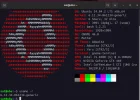
I recently installed kernel version 6.12, after using v.6.8, and I have no problems working with neumoDVB.
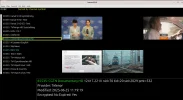
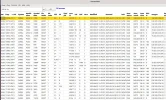
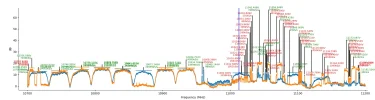
Even if I don't have to confirm with pictures, here is an example at 1.0W, scanning and rendering found services with neumoDVB using the 6903x card.
Attachments
satesco
Specialist Contributor
- My Satellite Setup
- seven antennas,one toroidal with 16 lnbs,
6 satellite receivers,2 Meters,9 PC cards(tbs6983,6903,6590,6504,6522,6209,2603,6909X,6903X,6902se,skystar hd2),2 tuners usb-tbs5927, TBS5927SE USB & tbs5925,Skystar HD.
Satellite reception between 100.5E-50.0W
- My Location
- Romania
Finally, after several attempts, I successfully ran the stream 5 T2-MI on 12606 V following the procedure described above.I have just release a driver update. Note that these drivers have not been well tested yet and there may
be some problems, but at least basic functionality works.
From a practical point, the drivers fix a problem on the multistream on 12606V @5.0W, which no longer
worked on stid135 cards due to what is probably a hardware bug. To make this stream work add
the following line to /etc/modprobe.d/stid135.conf:
Install the new drivers and reboot.Code:options stid135 bbframes_auto=1
Internally the code works by asking the chip to output a "bbframes stream" and let the drivers extract
the transport stream. This happens only for multistreams, but has as a side effect that ALL streams in the
mux are available at the output. This means that multiple streams can be accessed with a single demod at the
same time.
Currently the only program that supports using this is neumo-dmx, part of the command-line neumo tools.
Here is an example. Note that this only works on stid135 based cards!!
First tune to a mux, using adapter 8 and the LNB the cable connected to RF input 1. The LNB is connected to a switch
on uncommitted port 3. The mux we tune is 12606V on 5.0W. It uses physical layer srambling with code ROOT+16416.
We ask the frontend to output bbframes instead of a stransport stream:
Code:neumo-tune -ctune -A blind -a 8 -r 1 -U3 -f 12606000 -pV --pls-code=ROOT+16416 --stream-id=4 -b &
Now extract the two streams by connecting to frontend 0 on demux 8. We specify 0x2000 as the pid,
which means the whole transport stream. the two streams have ISI 3 and 5:
Code:neumo-dmx -a 8 -d 0 --pid 0x2000 -b --bbframes-isi=4 > /tmp/stream4.ts & neumo-dmx -a 8 -d 0 --pid 0x2000 -b --bbframes-isi=5 > /tmp/stream5.ts &
After a while stop the three commands (neumo-tune and neumo-dmx):
Code:killall -KILL neumo-dmx neumo-tune
Stream 4 is a regular transport stream as can be seen by inspecting it with
Code:tsanalyze /tmp/stream4.ts
Stream 5 is a transport stream containing one T2mi stream with pid 0x1000. Extract it as follows:
Code:tsp -P t2mi --pid=0x1000 < /tmp/stream5.ts > /tmp/stream5b.ts
Then it can be analyzed as follows:
These streams can also be played by vlc.Code:tsanalyze /tmp/stream5b.ts
With some appropriate linux piping, these streams can also be streamed over the network, simultaneously.
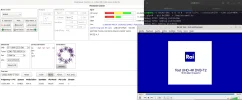
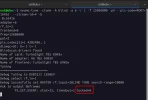
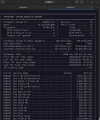
I didn't understand why with the command "neumo-tune -ctune -A blind -a 6 -r 1 -U3 -f 12606000 -pV --pls-code=ROOT+16416 --stream-id=4 -b" the signal on 12606 V is not locked even though it is over 11dB(?).
Only directly, through neumoDVB Positioner, was I able to provide the signal for this stream, and not through Neumo-Tune, so that you can view the TV programs on this T2-Mi stream.
What exactly is missing in the neumo-tune to lock the signal on 12606 V?
Attachments
satesco
Specialist Contributor
- My Satellite Setup
- seven antennas,one toroidal with 16 lnbs,
6 satellite receivers,2 Meters,9 PC cards(tbs6983,6903,6590,6504,6522,6209,2603,6909X,6903X,6902se,skystar hd2),2 tuners usb-tbs5927, TBS5927SE USB & tbs5925,Skystar HD.
Satellite reception between 100.5E-50.0W
- My Location
- Romania
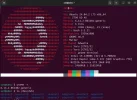
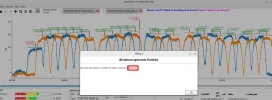
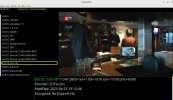
For those interested, I installed Kernel 6.14.2 on Ubuntu 24.04.2 LTS, and as you can see, @deeptho's app works well.
Attachments
tasoss
Member
- My Satellite Setup
- 6903,6903x,6909x 6908 etc. Dishes on various satellites(7east,39east,30w,8w etc) Windows & Linux for blind scanning and Linux for channel scanning.
- My Location
- Greece
@deeptho
I am having the following problem , using the latest drivers from git.
On 6903x cards(on two different machines) i can't use rf input 1.
I can run stid135-blindscan -cblindscan -a 0 1 -U8 --rf-in=0
but not
stid135-blindscan -cblindscan -a 0 1 -U8 --rf-in=1
I am getting
Could not open /dev/dvb/adapter0/frontend0
It doesn't work even if i use -a 0 or -a 1.
Am i missing something?
Thanks.
I am having the following problem , using the latest drivers from git.
On 6903x cards(on two different machines) i can't use rf input 1.
I can run stid135-blindscan -cblindscan -a 0 1 -U8 --rf-in=0
but not
stid135-blindscan -cblindscan -a 0 1 -U8 --rf-in=1
I am getting
Could not open /dev/dvb/adapter0/frontend0
It doesn't work even if i use -a 0 or -a 1.
Am i missing something?
Thanks.
deeptho
Specialist Contributor
- My Satellite Setup
- Wavefrontier T90, Laminas 120cm, 2 other dishes; tbs 5927, tbs6904, tbs6909x, tbs6903x, tbs5990, tbs6981,tbs5927
- My Location
- Europe
It works for me on tbs6909x. If you want help, you will need to provide more info.@deeptho
I am having the following problem , using the latest drivers from git.
On 6903x cards(on two different machines) i can't use rf input 1.
I can run stid135-blindscan -cblindscan -a 0 1 -U8 --rf-in=0
but not
stid135-blindscan -cblindscan -a 0 1 -U8 --rf-in=1
I am getting
Could not open /dev/dvb/adapter0/frontend0
It doesn't work even if i use -a 0 or -a 1.
Am i missing something?
Thanks.
tasoss
Member
- My Satellite Setup
- 6903,6903x,6909x 6908 etc. Dishes on various satellites(7east,39east,30w,8w etc) Windows & Linux for blind scanning and Linux for channel scanning.
- My Location
- Greece
deeptho
Specialist Contributor
- My Satellite Setup
- Wavefrontier T90, Laminas 120cm, 2 other dishes; tbs 5927, tbs6904, tbs6909x, tbs6903x, tbs5990, tbs6981,tbs5927
- My Location
- Europe
This is how the card is wired internally (1 and 2 are not connected). Adding a layer of translation between what the user expects and how the card is wired would just add complexity.@deeptho
It works for me on 6909x too.
After some debugging i can tell you that for some reason(maybe because of the drivers?) the vector rf_inputs contains the values 0 and 3.
This means that if i pass --rf-in=3 it works as expected.
Any ideas?
If you need more info let me know.
So indeed use rf_in=3...