
You are using an out of date browser. It may not display this or other websites correctly.
You should upgrade or use an alternative browser.
You should upgrade or use an alternative browser.
Satdump software & wxsat reception
- Thread starter Analoguesat
- Start date
sat-tv-fan
Specialist Contributor
- My Satellite Setup
- 1m motorised dish + Octagon 0.1db PLL LNB
(66 E) 42 E - 45.0 W
Azbox HD Premium
Azbox ME
Amiko A3 combo (android)
TBS 5925 and 5927 USB
TBS 6903 (for Eumetsat weather decoding on 10 East)
GT Media V8
Octogan SX88+
Octagon SF8008
Koqit K1 mini
Openbox SX6 HD
Mecool K3 pro (android)
X2 Premium HD
Skybox F3
Technomate 5302 HD
Technomate 5402 M3
iSmart X8
- My Location
- East Sussex, South East UK


Terryl
Specialist Contributor
- My Satellite Setup
- OpenBox X5 on a 1 meter motorized dish.
And now a 10 foot "C" band dish.
Custom built PC
- My Location
- Deep in the Boonies in the central Sierra Nevada mountains of California.
Never had that error, what version are you installing and what platform??Giving satdump a go. Any worries about 'path too long' during install?
Terryl
Specialist Contributor
- My Satellite Setup
- OpenBox X5 on a 1 meter motorized dish.
And now a 10 foot "C" band dish.
Custom built PC
- My Location
- Deep in the Boonies in the central Sierra Nevada mountains of California.
How do you have the sound settings on your computer setup??I have never heard any audio with satdump. Every time a pass starts or finishes I get this also
ArloG
Member
- My Satellite Setup
- 12' Fiberglass Dish, C2W & Geosat Pro lnbf, Titanium ASC-1, Osmio4k, Zgemma H7 Client
- My Location
- N. Central PA, USA
Windows 10 and tried it also on Windows 11. Tried once selecting the path for all users and just for me on both pc's.Never had that error, what version are you installing and what platform??
If it's even an issue. It does still look kind of rinky-dink.
Any clue if it will work with an IC-R8600 with extio drivers for 64 bit? I placed them in the "looks like the right" directory but no joy.
And yeah. What is port audio and why is there not any in-your-face menu selections for settings?
I use VB Cable for my audio routing with SDR sw. or just straight in USB audio from the radio.

- My Satellite Setup
- TM 5402HD
Sky+ UK.
- My Location
- Scottish Borders
You dont need Virtual Audio Cables with satdump - its all handled internally
No idea if it will work with a receiver, but you could record the audio to a wav file and post process it using satdump - that would work.
No idea if it will work with a receiver, but you could record the audio to a wav file and post process it using satdump - that would work.
- My Satellite Setup
- TM 5402HD
Sky+ UK.
- My Location
- Scottish Borders
Are you running linux? That error appears to be there are two instances of portaudio runningI have never heard any audio with satdump. Every time a pass starts or finishes I get this also

How to fix portaudio error, PortAudio not initialized?
I'm using a library called pyo to create an audio server I've tried doing this from pyo import * s = Server() s.boot() I have tried building portaudio again but still I get the error. I am usin...
 stackoverflow.com
sat-tv-fan
Specialist Contributor
- My Satellite Setup
- 1m motorised dish + Octagon 0.1db PLL LNB
(66 E) 42 E - 45.0 W
Azbox HD Premium
Azbox ME
Amiko A3 combo (android)
TBS 5925 and 5927 USB
TBS 6903 (for Eumetsat weather decoding on 10 East)
GT Media V8
Octogan SX88+
Octagon SF8008
Koqit K1 mini
Openbox SX6 HD
Mecool K3 pro (android)
X2 Premium HD
Skybox F3
Technomate 5302 HD
Technomate 5402 M3
iSmart X8
- My Location
- East Sussex, South East UK
Just normal windows 10 64bitAre you running linux? That error appears to be there are two instances of portaudio running
How to fix portaudio error, PortAudio not initialized?
I'm using a library called pyo to create an audio server I've tried doing this from pyo import * s = Server() s.boot() I have tried building portaudio again but still I get the error. I am usin...
Terryl
Specialist Contributor
- My Satellite Setup
- OpenBox X5 on a 1 meter motorized dish.
And now a 10 foot "C" band dish.
Custom built PC
- My Location
- Deep in the Boonies in the central Sierra Nevada mountains of California.
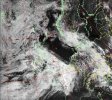
I think Meteor M2-4 is tipped on it's side as I'm getting the same as you all.
Un-touched photo.

Un-touched photo.

ArloG
Member
- My Satellite Setup
- 12' Fiberglass Dish, C2W & Geosat Pro lnbf, Titanium ASC-1, Osmio4k, Zgemma H7 Client
- My Location
- N. Central PA, USA
If anyone has gotten the path added in environment variables would it be possible to paste the line here so I can troubleshoot?Windows 10 and tried it also on Windows 11. Tried once selecting the path for all users and just for me on both pc's.
If it's even an issue. It does still look kind of rinky-dink.
Any clue if it will work with an IC-R8600 with extio drivers for 64 bit? I placed them in the "looks like the right" directory but no joy.
And yeah. What is port audio and why is there not any in-your-face menu selections for settings?
I use VB Cable for my audio routing with SDR sw. or just straight in USB audio from the radio.
And if you know. What advantage does it give over the don't add path option during install?
- My Satellite Setup
- TM 5402HD
Sky+ UK.
- My Location
- Scottish Borders
Hmm this is looking better. This is a Meteor pass from a couple of days ago as its my last decent capture. Once Ive figured out what Im doing after dinner I'll post some instructions

- My Satellite Setup
- TM 5402HD
Sky+ UK.
- My Location
- Scottish Borders
OK in Satdump go into SETTINGS & make sure you have at least these set. Ive blurred my exact location for obvious reasons.
The output directories arent a permanent thing as Ive just dropped a copy of that Met folder from a couple of days ago onto my desktop to play with. They would change if I started playing with this properly
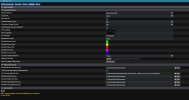
The output directories arent a permanent thing as Ive just dropped a copy of that Met folder from a couple of days ago onto my desktop to play with. They would change if I started playing with this properly
- My Satellite Setup
- TM 5402HD
Sky+ UK.
- My Location
- Scottish Borders
Next go to VIEWER & set things up something like this - there are various settings you can play with
The load dataset/products is the dataset.json file in the top folder of your Meteor data

I havent figured out yet why it isnt loading my home location - the lat/long is set to 4 decimal places (hence why I obliterated it!) & the box is ticked
More when Ive played with it a bit more. It'll give you something to start tinkering with.
One thing I would suggest - if you have a dataset you are particularly wanting to keep - work on a COPY of it!!
The load dataset/products is the dataset.json file in the top folder of your Meteor data
I havent figured out yet why it isnt loading my home location - the lat/long is set to 4 decimal places (hence why I obliterated it!) & the box is ticked
More when Ive played with it a bit more. It'll give you something to start tinkering with.
One thing I would suggest - if you have a dataset you are particularly wanting to keep - work on a COPY of it!!

hairybadger
Bricoleur
- My Satellite Setup
- see sig
- My Location
- near Geneva, Haute-Savoie, France
Got the RTL-SDR (nooelec), got satdump, reading the doc. What have I got myself into? 
hairybadger
Bricoleur
- My Satellite Setup
- see sig
- My Location
- near Geneva, Haute-Savoie, France
Got the RTL-SDR (nooelec), got satdump, reading the doc. What have I got myself into?
I'm a bit confused about the aerial I should be using. Meteor-m2 3 should be AOS in about 13 minutes. The kit came with three antennae - something like 15cm and 30cm with coils and an extensible "car radio" one. I'm not sure if any of them are suitable having read @Analoguesat 's experiences.Load up some satellites and see what you get.
Terryl
Specialist Contributor
- My Satellite Setup
- OpenBox X5 on a 1 meter motorized dish.
And now a 10 foot "C" band dish.
Custom built PC
- My Location
- Deep in the Boonies in the central Sierra Nevada mountains of California.
Some of the satellites like the Meteors have a weaker signal then the others like the NOAA satellites, so you might need to use an external antenna like the ones posted earlier in this section.
What documentation on the aerials came with the dongle?? I would try the one with the frequency range in the 136 to 138 MHz range.
Or what did you order from Nooelec? I can look it up.
What documentation on the aerials came with the dongle?? I would try the one with the frequency range in the 136 to 138 MHz range.
Or what did you order from Nooelec? I can look it up.